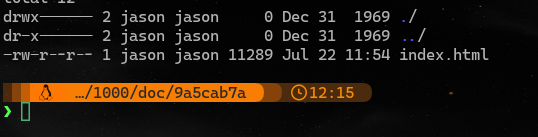
you omitted the actual file path, but it looks like an xdg portal mapped path, so I'm guessing you are probably using a sandboxed browser.
as @kingparra said, you have to explicitly grant local filesystem access to the browser app.
alternatively, you can start a local http server, and point the browser to the url, something like http://localhost:8000/htm/index.html, you only need to serve static files, so you can use any http server you like.
shameless plug
I also wrote a simple program for this exact use case:
GitHub - nerditation/cargo-serve-doc: serve local `cargo doc` artifacts over http
the basic usage is to serve local build of crate docs, it use $CARGO_MANIFEST_DIR/target/doc/ as the http server root directory. when the open subcommand is given, it is expected to be called by cargo doc --open as a proxy command for your browser and convert the command line argument, which should be a local file path, into the corresponding url.
# build the doc
$ cargo doc
# serve the doc
$ cargo serve-doc &
# open your favorite browser, default port is 8000
$ flatpak run org.mozilla.firefox http://localhost:8000/CRATENAME/index.html

# or combine the above commands into a single one:
$ cargo serve-doc open --build
when use the --rustup option, this tool can also serve the the toolchain docs (i.e. the rust-docs component of rustup), it calls rustup doc --path to get the locaiton of the doc files instead of $CARGO_MANIFEST_DIR/target/doc, and start the http server there, extra command line arguments are appended to rustup doc --path, for example:
# by default opens the rust documentation landing page
$ cargo serve-doc open --rustup
# open the book
$ cargo serve-doc open --rustup -- --book
# open the documentation of `core`
$ cargo serve-doc open --rustup core
I wrote this tool for personal use, so I didn't bother to write much documentation, but it's a simple tool with not much functionalities really. in case you need more than what I have in mind, the source code is there, happy hacking and have fun.