Tokio Network Forwarding Optimization
I’ve built a general-purpose proxy that supports HTTP, HTTPS, and SOCKS5.
- GitHub repo: vproxy
When benchmarked against fast-socks5, its SOCKS5 performance is roughly equivalent.
However, network forwarding performance falls significantly behind hev-socks5-server.
The following benchmarking steps are adapted from the hev-socks5-server repo.
Start an iperf3 server
1. Start the iperf3 server
iperf3 -s
2. Start the SOCKS5 proxy servers
# Run vproxy
cargo install vproxy
vproxy run socks5

# Run fast-socks5
git clone https://github.com/dizda/fast-socks5
cargo run --release --example server -- -l "127.0.0.1:1080" no-auth

# Run hev-socks5-server (setup is more complex; skipping config details, see README: https://github.com/heiher/hev-socks5-server)
wget https://github.com/heiher/hev-socks5-server/releases/download/2.10.0/hev-socks5-server-linux-arm64
./hev-socks5-server-linux-arm64 main.yml
3. Run benchmarks with proxychains
proxychains iperf3 -c 127.0.0.1
4. Results
Machine: MacBook Pro M3Max, macOS 15.7 (Orbstack Ubuntu 24.04 LTS)
- vproxy
➜  0x676e67 proxychains iperf3 -c 127.0.0.1
ProxyChains-3.1 (http://proxychains.sf.net)
|S-chain|-<>-127.0.0.1:1080-<><>-127.0.0.1:5201-<><>-OK
Connecting to host 127.0.0.1, port 5201
|S-chain|-<>-127.0.0.1:1080-<><>-127.0.0.1:5201-<><>-OK
[  5] local 127.0.0.1 port 56264 connected to 127.0.0.1 port 1080
[ ID] Interval           Transfer     Bitrate         Retr  Cwnd
[  5]   0.00-1.00   sec  4.69 GBytes  40.3 Gbits/sec    0    639 KBytes
[  5]   1.00-2.01   sec  4.64 GBytes  39.7 Gbits/sec    0    639 KBytes
[  5]   2.01-3.00   sec  4.70 GBytes  40.6 Gbits/sec    0    639 KBytes
[  5]   3.00-4.01   sec  4.64 GBytes  39.6 Gbits/sec    0    639 KBytes
[  5]   4.01-5.01   sec  4.96 GBytes  42.7 Gbits/sec    0    639 KBytes
[  5]   5.01-6.00   sec  4.79 GBytes  41.2 Gbits/sec    0    639 KBytes
[  5]   6.00-7.01   sec  4.74 GBytes  40.6 Gbits/sec    0    639 KBytes
[  5]   7.01-8.00   sec  4.75 GBytes  41.1 Gbits/sec    0    639 KBytes
[  5]   8.00-9.01   sec  4.44 GBytes  37.9 Gbits/sec    0    639 KBytes
[  5]   9.01-10.00  sec  4.45 GBytes  38.4 Gbits/sec    0    639 KBytes
- - - - - - - - - - - - - - - - - - - - - - - - -
[ ID] Interval           Transfer     Bitrate         Retr
[  5]   0.00-10.00  sec  46.8 GBytes  40.2 Gbits/sec    0            sender
[  5]   0.00-10.00  sec  46.8 GBytes  40.2 Gbits/sec                  receiver

iperf Done.
- fast-socks5
➜  0x676e67 proxychains iperf3 -c 127.0.0.1
ProxyChains-3.1 (http://proxychains.sf.net)
|S-chain|-<>-127.0.0.1:1080-<><>-127.0.0.1:5201-<><>-OK
Connecting to host 127.0.0.1, port 5201
|S-chain|-<>-127.0.0.1:1080-<><>-127.0.0.1:5201-<><>-OK
[  5] local 127.0.0.1 port 51032 connected to 127.0.0.1 port 1080
[ ID] Interval           Transfer     Bitrate         Retr  Cwnd
[  5]   0.00-1.01   sec  4.80 GBytes  41.0 Gbits/sec    0    639 KBytes
[  5]   1.01-2.01   sec  4.88 GBytes  41.9 Gbits/sec    0    639 KBytes
[  5]   2.01-3.01   sec  4.64 GBytes  39.9 Gbits/sec    0    639 KBytes
[  5]   3.01-4.00   sec  4.62 GBytes  39.8 Gbits/sec    0    639 KBytes
[  5]   4.00-5.01   sec  4.72 GBytes  40.4 Gbits/sec    0    639 KBytes
[  5]   5.01-6.01   sec  4.97 GBytes  42.7 Gbits/sec    0    639 KBytes
[  5]   6.01-7.01   sec  4.84 GBytes  41.6 Gbits/sec    0    639 KBytes
[  5]   7.01-8.01   sec  4.91 GBytes  42.2 Gbits/sec    0    639 KBytes
[  5]   8.01-9.01   sec  4.64 GBytes  39.8 Gbits/sec    0    639 KBytes
[  5]   9.01-10.01  sec  4.79 GBytes  41.2 Gbits/sec    0    639 KBytes
- - - - - - - - - - - - - - - - - - - - - - - - -
[ ID] Interval           Transfer     Bitrate         Retr
[  5]   0.00-10.01  sec  47.8 GBytes  41.1 Gbits/sec    0            sender
[  5]   0.00-10.04  sec  47.8 GBytes  40.9 Gbits/sec                  receiver

iperf Done.
- hev-socks5-server
➜  0x676e67 proxychains iperf3 -c 127.0.0.1
ProxyChains-3.1 (http://proxychains.sf.net)
|S-chain|-<>-127.0.0.1:1080-<><>-127.0.0.1:5201-<><>-OK
Connecting to host 127.0.0.1, port 5201
|S-chain|-<>-127.0.0.1:1080-<><>-127.0.0.1:5201-<><>-OK
[  5] local 127.0.0.1 port 48570 connected to 127.0.0.1 port 1080
[ ID] Interval           Transfer     Bitrate         Retr  Cwnd
[  5]   0.00-1.01   sec  9.96 GBytes  85.0 Gbits/sec    0   1.06 MBytes
[  5]   1.01-2.01   sec  10.6 GBytes  91.0 Gbits/sec    0   1.06 MBytes
[  5]   2.01-3.01   sec  11.3 GBytes  97.2 Gbits/sec    0   1.06 MBytes
[  5]   3.01-4.00   sec  14.7 GBytes   127 Gbits/sec    0   1.06 MBytes
[  5]   4.00-5.01   sec  12.1 GBytes   104 Gbits/sec    0   1.06 MBytes
[  5]   5.01-6.01   sec  10.6 GBytes  91.0 Gbits/sec    0   1.06 MBytes
[  5]   6.01-7.01   sec  10.5 GBytes  90.4 Gbits/sec    0   1.06 MBytes
[  5]   7.01-8.01   sec  10.5 GBytes  89.9 Gbits/sec    0   1.06 MBytes
[  5]   8.01-9.01   sec  10.4 GBytes  89.7 Gbits/sec    0   1.06 MBytes
[  5]   9.01-10.01  sec  10.6 GBytes  91.2 Gbits/sec    0   1.06 MBytes
- - - - - - - - - - - - - - - - - - - - - - - - -
[ ID] Interval           Transfer     Bitrate         Retr
[  5]   0.00-10.01  sec   111 GBytes  95.6 Gbits/sec    0            sender
[  5]   0.00-10.05  sec   111 GBytes  95.2 Gbits/sec                  receiver

iperf Done.
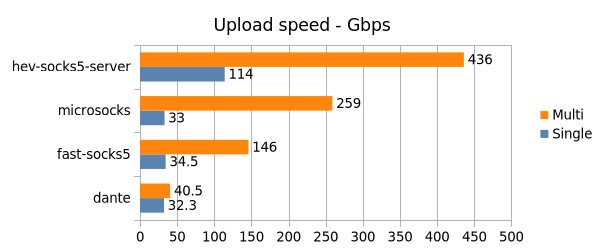
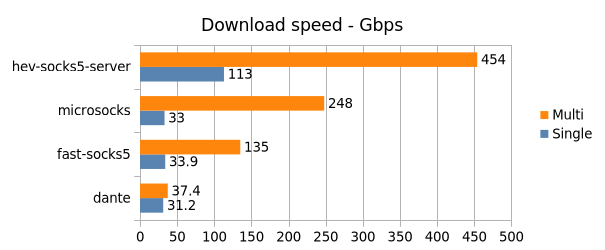
From the benchmark results, it can be seen that vproxy and fast-socks5 have comparable performance, while hev-socks5-server outperforms the former two significantly.
Hev-socks5-server is written in C language, and the performance of the coroutines they wrote is very good. I would like to know if there are any suggestions or methods to improve the network forwarding performance of Tokio. Thank you all!